
On This Page
If you’re upgrading or switching devices, you might be wondering: Does iPhone 11 have SIM card? Despite newer models moving toward eSIM-only designs, the iPhone 11 still offers flexible connectivity. It supports both a physical Nano-SIM and a digital eSIM, making it a practical choice for users who want dual numbers or easy carrier switching.
This guide breaks down everything you need to know about SIM options on the iPhone 11.
1. Does the iPhone 11 Still Have a SIM Card?
Does the iPhone 11 have SIM card compatibility? It’s a common question for users upgrading their devices. Yes, the iPhone 11 supports a physical Nano-SIM card alongside modern digital eSIM technology.
The iPhone 11 features a physical Nano-SIM tray located on the right side of the device. Unlike newer US models like the iPhone 14 or 16, which are eSIM-only, the iPhone 11 retains a physical SIM slot, allowing you to use a traditional physical SIM card.
In addition to the physical SIM slot, the iPhone 11 supports dual-SIM functionality via an embedded eSIM. This allows you to have two active phone numbers simultaneously, one on a physical card and one digital, which is ideal for separating work and personal lines or using a local data plan while traveling.
Note that models sold in Mainland China, Hong Kong, and Macao typically feature two physical Nano-SIM slots instead of eSIM support.
2. Does the iPhone 11 have eSIM or SIM?
This is also a common question for users looking to manage two phone numbers or use affordable local data while traveling internationally.
The standard Apple iPhone 11 features dual SIM capability, using one physical nano-SIM and one digital eSIM. This allows you to keep your primary physical card in the tray while adding a secondary digital plan through your phone’s settings.
However, there are important regional differences to keep in mind. If you are wondering, does iPhone 11 have eSIM? The answer depends on the region.
iPhone 11 models sold in Mainland China, Hong Kong, and Macao do not support eSIM and instead use a dual-sided tray for two physical nano-SIM cards. To use eSIM in other regions, the device must be carrier-unlocked, and your mobile provider must support digital SIM technology.
3. Is the iPhone 11 Dual SIM?
Yes, the iPhone 11 supports Dual SIM functionality. This allows you to use two active phone numbers simultaneously for personal and business use or international travel.
The device supports dual connectivity through a physical nano-SIM slot and a digital eSIM for secondary lines.
Dual SIM capabilities
In most global regions, the iPhone 11 features one physical nano-SIM card slot and one built-in eSIM (digital SIM). You can insert a standard nano-SIM for your primary service and activate a secondary line via eSIM by scanning a QR code from your carrier in the iPhone Settings menu.
This “Dual SIM Dual Standby” technology ensures both numbers can receive calls and messages at any time.
Regional variations
It is important to note that models sold in Mainland China, Hong Kong, and Macao differ from the global version.
These specific models feature a special tray that holds two physical nano-SIM cards (one on each side) instead of using an eSIM. Regardless of the model, you must ensure your device is carrier-unlocked to use services from two different network providers.
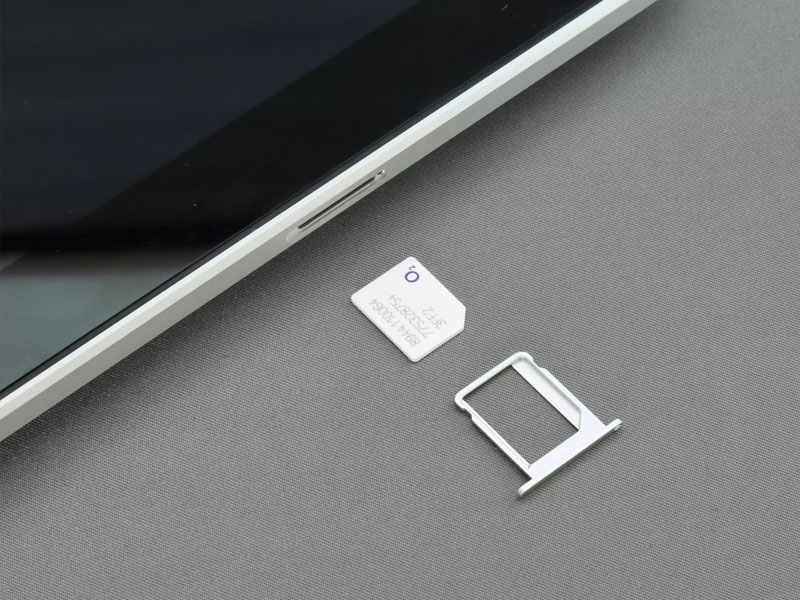
The iPhone 11 supports Dual SIM functionality (Image by Unsplash)
4. How Do You Get to the SIM Card on an iPhone 11?
Does iPhone 11 have SIM card slots? Yes, it uses a physical nano-SIM. Accessing it is simple if you know where to look and have the right tools.
Locate the SIM tray
On the iPhone 11, the SIM tray is positioned on the right-hand side of the device, about halfway down the edge. It appears as a thin, oval-shaped outline with a tiny pinhole at one end. Before removing the tray, ensure your phone is powered off to protect your data and the device’s internal components.
Use a SIM eject tool
To open the tray, insert a SIM eject tool or a sturdy, straightened paperclip into the small hole next to the tray. Push firmly but gently toward the phone until the tray pops out slightly.
Avoid using needles or overly sharp objects, as these can damage the internal mechanism or scratch the frame.
Insert or remove the SIM card
Pull the tray out completely and place your nano-SIM into the slot, ensuring the notched corner aligns perfectly with the tray. Because the tray is keyed, the card will only fit in one orientation. After it is seated flat, slide the tray back into the phone until it is flush with the side of the device.
5. Can the iPhone 11 Have Two eSIMs?
No, the iPhone 11 cannot have two eSIMs active at the same time. While it supports dual-SIM functionality and allows storage of multiple eSIM profiles, it is limited to running one active eSIM and one physical nano-SIM simultaneously.
Final Thoughts
The iPhone 11 supports both a physical Nano-SIM and an eSIM, so if you’re asking “Does iPhone 11 have a SIM card?”, the answer is definitely yes. This dual-SIM capability makes it easy to use two phone numbers on one device, which is especially useful for managing personal and work lines or switching between different carriers when needed.