

On This Page
Several opinions claimed that an iPad might not be the best fit for those on a tight budget. While it is indeed out of reach for many low-income families or individuals to get a tablet for free, a lot of government programs have been launched to help impoverished people.
Here’s how they can receive a free government iPad and make their life better.
1. Free Government iPad: Which Program Offers the Best Benefit?
The Affordable Connectivity Program (ACP) offered internet and device-related benefits until it ended in 2024. Today, while Lifeline continues to help reduce communication costs, any tablet offers come from participating providers rather than the Lifeline program itself.
Lifeline is a federal program that provides a monthly discount on service. Dated back to the 1980s, the initiative has been running for years and provided affordable connectivity to US citizens.
Eligible households can receive a Lifeline benefit of up to $9.25 per month toward qualifying phone or internet service. Those living on qualifying Tribal lands may receive up to $34.25 per month.
2. How Can I Get a Free iPad From the Government?
Eligibility
You can’t go without checking beforehand whether you’re eligible for Lifeline. Who is eligible for a free iPad? These are the requirements that decide your Lifeline qualification:
- If your household income is at or below 135% of the Federal Poverty Guidelines. The threshold varies based on the size of your household and state.
- OR if you or someone else in your household are getting benefits from one or more of these government programs:
- Supplemental Nutrition Assistance Program (SNAP/Food Stamps)
- Medicaid
- Supplemental Security Income (SSI)
- Federal Public Housing Assistance (FPHA)
- Veterans Pension or Survivors Benefit
- Tribal-Specific Programs
For example, you can get a free government iPad with EBT if you’re a SNAP recipient and submit valid food stamps documents.
In another case, your family member can get a free iPad with Medicaid if they are a Medicaid recipient.
However, please remember that each household can only receive one Lifeline benefit. If there are two or more separate households living at the same address, each household can apply for a Lifeline benefit, but they must provide proof of being distinct households.
Instruction on how to get a free government iPad
Below is a breakdown on 5 steps to follow to receive a government iPad:
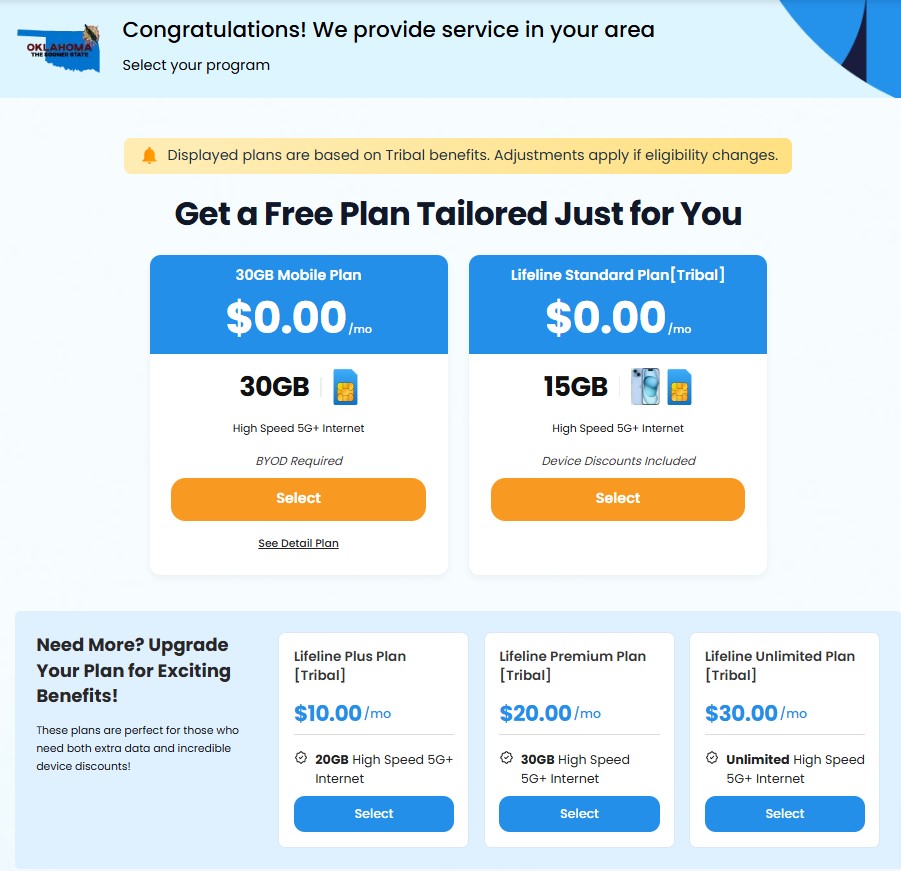
Step 2: Select a Lifeline Plan
Once you’ve confirmed that your location qualifies for Lifeline, choose a plan that works best for you.
If you already have a device or phone number you wish to keep, you can opt for the BYOD (Bring Your Own Device) option. This will provide you with the service without requiring a new device.
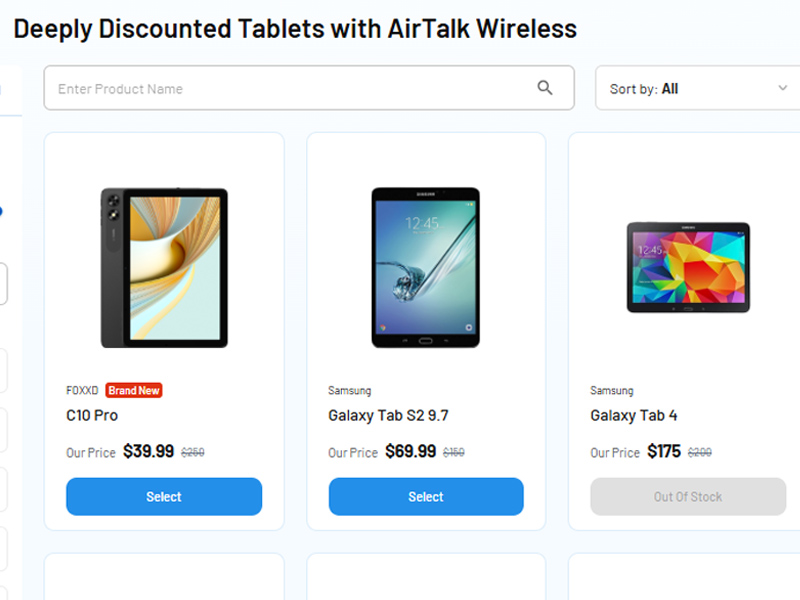
Step 3: Pick a Tablet or Phone
While some tablets, including iPads, may require a small fee, the prices are significantly more affordable compared to typical retail options.
Step 4: Submit documents
Provide the necessary documentation to prove your eligibility for a free iPad.
For more details on accepted documents, click HERE.
What kind of iPad can a consumer get that can fulfill all of their needs? Here’s a suggestion for those who are seeking discounted and free iPads for students and seniors.
Free government iPad for students
| iPad models | Why students should use them |
|---|---|
| Apple iPad 6 | Basic productivity and education apps Supports Apple Pencil for notetaking Decent battery life Modern iOS compatibility |
| Apple iPad Air | Lightweight design Strong for multitasking and school projects |
| Apple iPad Pro 9.7-inch | Excellent display quality Fast processor suitable for heavy apps and multitasking Supports Apple Pencil |
Free government iPad for seniors
| iPad models | Why seniors should use them |
|---|---|
| Apple iPad Mini 2 | Compact size, easy to hold and use. Simple interface for basic browsing, video calls |
| Apple iPad Mini | Similar advantages as the Mini 2 User-friendly size Great for reading, video chats, and light media consumption |
| Apple iPad 3 | Basic functionality for light users Ideal for seniors unfamiliar with advanced features |
Apple iPad 4 and Apple iPad Mini 3 are suitable for both groups as these models have compact design, balanced and sufficient performance.
FAQs
Can I get a free government iPad if I already own a tablet?
Yes. Eligibility is usually based on income or participation in a qualifying assistance program, not whether you already own a tablet.
What happens to my free government iPad if I move to a different state?
You can usually keep your device, but you should update your address with your service provider.
Can I sell or give away my free government iPad after receiving it?
This depends on your provider’s terms. Check the program rules before transferring the device.
Is there a waiting list for the free government iPad program?
Most providers do not have a formal waiting list, but device availability may be limited.
Does the free government iPad come with pre-installed apps or restrictions?
Some devices may include carrier apps or service-related software, depending on the provider.
6. Final Thoughts
For many low-income households, a free government iPad can make online learning, job applications, video calls, and daily communication much more accessible.