
On This Page
A tablet is a valuable tool for staying connected in today’s life. From accessing online services and job opportunities to managing schoolwork and daily tasks, having a reliable device is essential. However, not everyone can afford one.
1. Lifeline – Best Program For a Free Government Tablet Michigan

The Lifeline program gives recipients access to free or discounted services.
Lifeline is a federal assistance program established by the Federal Communications Commission (FCC). It aims to ensure that low-income individuals have access to essential communication services. Since its launch in 1985, the program has helped millions of Americans by offering discounts on phone and internet services.
How does Lifeline benefit its recipients? Through Lifeline, qualifying Michigan residents can receive:
- The federal Lifeline offers a monthly discount of up to $9.25 on broadband or phone services. In addition, the Michigan Lifeline even increases the benefits. Specifically, those under 65 can receive a discount ranging from $8.25 to $10.25 per month. Meanwhile, senior Michigan residents (65+) are guaranteed a minimum discount of $12.35 per month.
- People living on Tribal lands can receive up to $34.25 in benefits.
All in all, the Michigan Lifeline program plays a crucial role in the developement of the state. It ensures that low-income individuals, seniors, and students can stay connected in today’s digital world.
2. Who Qualifies For a Free Government Tablet in Michigan Through Lifeline
Are you wondering if you qualify for Lifeline and can receive a free tablet? This section will provide the answer.
To receive a free tablet through Lifeline in Michigan, you must meet specific eligibility criteria. There are two main ways to qualify: income-based eligibility or participation in government assistance programs.
First, your household income must be at or below 135% of the Poverty Guidelines. For example, in 2024, a Michigan household must earn less than $20,331 annually (Note that income limits may change, so please check the official Lifeline website for updates).
Instead, if you already receive benefits from any of the following programs, you automatically qualify for Lifeline:
- Supplemental Nutrition Assistance Program (SNAP)
- Medicaid
- Supplemental Security Income (SSI)
- Federal Public Housing Assistance (FPHA)
- Veterans Pension and Survivors Benefit
Additionally, individuals residing on Tribal lands can qualify through Tribal-specific assistance programs like Tribal TANF or Bureau of Indian Affairs General Assistance.
Step 1: Check your eligibility and gather required documents
Before applying, it’s important to confirm that you qualify for the Lifeline program. Review the eligibility criteria mentioned earlier to ensure you meet the requirements.
Once you’ve determined your eligibility, prepare clear and legible copies of the following documents based on your eligibility category:
- Proof of eligibility (e.g., SNAP approval letter, Medicaid card)
- Proof of identity (e.g., driver’s license, passport)
- Proof of income (if applying through the income-based option)
Next, the website will display the service plans available in your area. There are two main options: Bring Your Own Device plan and plans that include new, discounted devices.
To receive a free tablet, select a plan that includes a device.
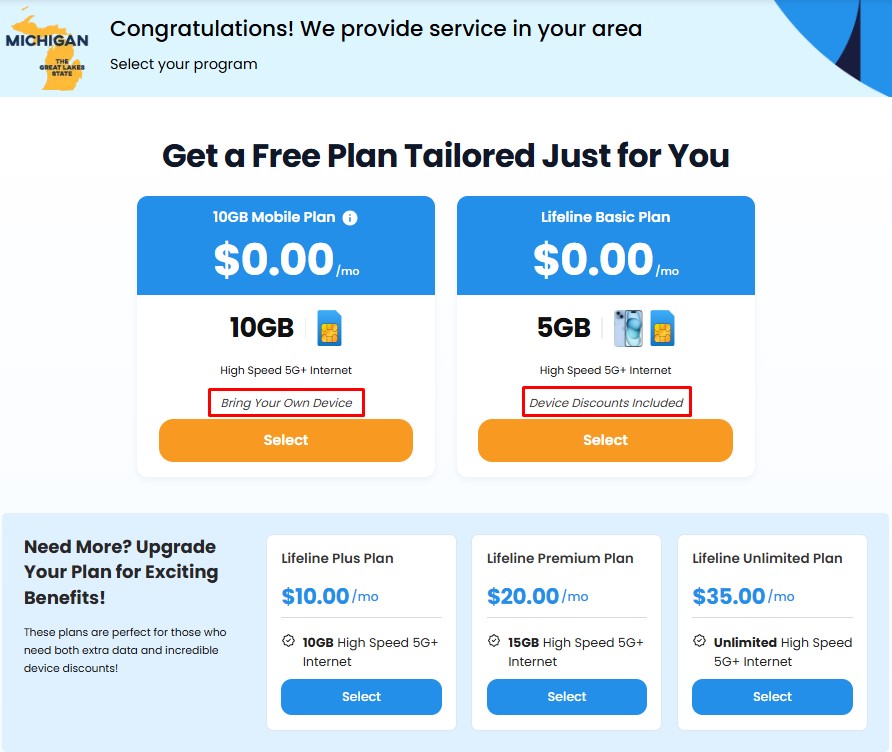
Make sure to choose the plan that also includes device discounts if you want to get a tablet.
Step 3: Choose your tablet
This is the most exciting step! The website will show you the available devices in your area. Be sure to select the “tablets” tab to browse through the tablet models.
Click on the image to read the device description and specifications. If you’re happy with the tablet, click “Select” to proceed to the next step.
Step 4: Submit your application
Now that you’ve selected your tablet, fill out the online application form with your personal details. Then upload the necessary documents for verification.
**Tip: **Make sure your signature is clear and legible, and all documents are readable to avoid any delays.
Also read: Best Budget Tablet 2025 – Top Affordable Picks for Gaming, Drawing, and Daily Use
4. Best Free Government Tablet Michigan Suggestions
Not sure which one to choose? We’ve got you covered! Here are some of the best tablets available, along with their standout features and ideal users:
| Options | Features | Who should use it |
|---|---|---|
| Samsung Galaxy Tab E | 9.6-inch display, Quad-core processor, 16GB storage | Seniors and casual users. Perfect for basic tasks like browsing and video calls. |
| Apple iPad 4 | 9.7-inch Retina display, A6X chip, 16GB storage | Students and professionals looking for a tablet that supports work, study, and light entertainment. |
| Samsung Galaxy Tab S5e | 10.5-inch Super AMOLED display, Snapdragon 670 processor, 64GB storage | This tablet is for multitaskers and media lovers. It’s the best choice for streaming, productivity, and gaming. |
| Apple iPad Mini 2 | 7.9-inch Retina display, A7 chip, 16GB storage | Users who need a compact and lightweight device. Great for reading, web browsing, and portability. |
| ZTE ZPad 10 2016 | 10-inch HD display, Quad-core processor, 32GB storage | Families and students who need an affordable tablet for learning, entertainment, and communication. |
Choose your tablet from our collection of Samsung, Apple tablets and more.
**Note: **While some of these tablets may not be 100% free, the price is heavily discounted, and availability can vary. These tablets are highly sought after, so act quickly to secure your favorite device!
5. FAQs
What is the best free government phone with unlimited everything?
The FOXXD A56 is one of the best options available for those seeking a free government phone with unlimited everything. It offers reliable performance and all the essential features to keep you connected.