

On This Page
You can get a free iPhone 8 if you qualify for government programs like Lifeline. Apple no longer sells the iPhone 8, but trusted Lifeline providers still offer it as a low-cost or zero-cost device. The phone works well for calls, apps, and daily use.
If you qualify for Lifeline, you may also get free talk, text, and monthly data. Want to see if you’re eligible for a free iPhone 8? Keep reading to learn how to apply.
1. iPhone 8 Review: Is It Still a Reliable Smartphone?
If you’re looking for a free iPhone 8, you’re not alone. Even though Apple stopped selling the iPhone 8, many people still want it. It works well, runs newer apps, and supports iOS 16.
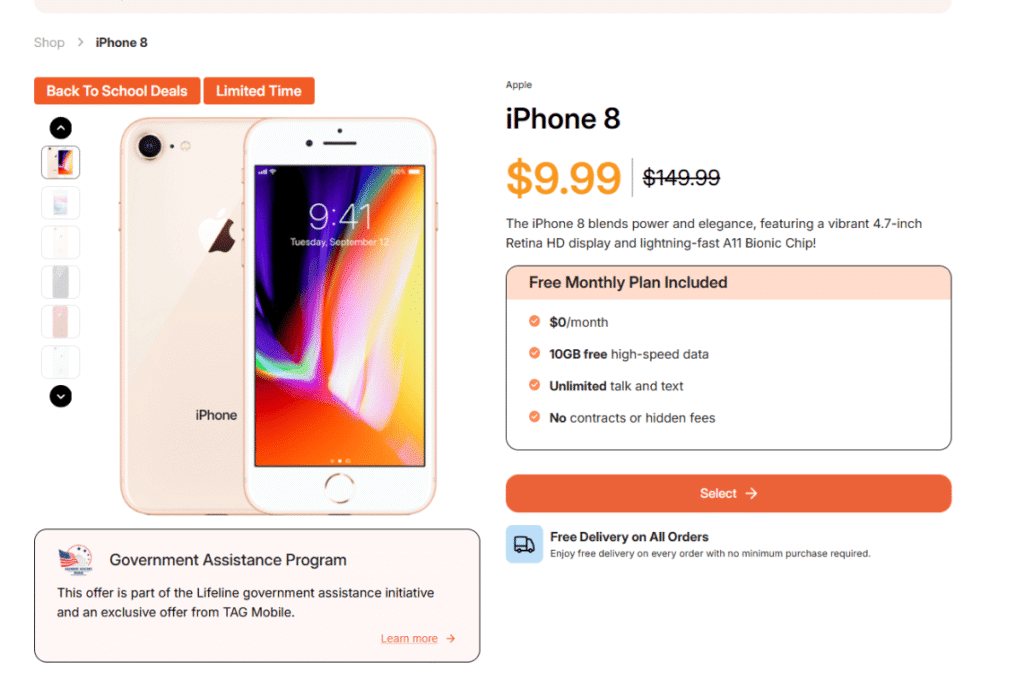
*Lifeline users can get an iPhone 8 as low as $9.99 *
1.1. iPhone 8 Specifications (At a Glance)
- A11 Bionic chip
- 4.7-inch Retina HD display
- Touch ID with Home button
- Wireless charging support
- Supports iOS up to version 16
These specs may not match the latest models, but they’re good enough for daily use like messaging, social media, and email.
1.2. Best Features of iPhone 8
You’ll still get solid performance with the iPhone 8. Here’s why many users like it:
- Compact size makes it easy to hold and carry
- Battery life works well for texting, calling, and light browsing
- A11 chip handles everyday apps without much lag
- Ongoing iOS support lets you use most apps in 2025
This phone is a good fit for seniors, students, and anyone who prefers a smaller device that still feels smooth and reliable.
1.3. iPhone 8 vs iPhone SE 2020 and iPhone 8 Plus
Many users wonder how the iPhone 8 compares to other low-cost models, like the SE 2020 or the Plus version. Here’s a simple comparison to help you decide which one fits your needs:
| Feature | iPhone 8 | iPhone SE (2020) | iPhone 8 Plus |
|---|---|---|---|
| Display | 4.7″ Retina HD | 4.7″ Retina HD | 5.5″ Retina HD |
| Chip | A11 Bionic | A13 Bionic | A11 Bionic |
| Camera | Single 12MP | Single 12MP | Dual 12MP |
| Size & Weight | Compact | Compact | Larger, heavier |
| Ideal For | Seniors, basic use | Faster apps, same size | Bigger screen fans |
If you’re looking for a bigger screen or a dual camera, the free iPhone 8 Plus government phone might work better. But for many people, the iPhone 8 still does the job well.
2. Can You Get a Free Government iPhone 8?
Yes, you can get a free iPhone 8 government phone today if you qualify for the Lifeline assistance program. Lifeline is a federal program that helps low-income households get access to mobile services and devices.
The retail price for an unlocked iPhone 8 is $149.99, but qualified users can get it at a heavily discounted rate of only $9.99 or even completely free in certain ZIP codes, especially on tribal lands.
2.1. Lifeline Support Levels
If you qualify for Lifeline, you can receive Lifeline subsidies for phone or monthly service plans. Lifeline support levels are:
- **Up to $9.25/month **standard subsidy for eligible low-income users
- Up to $34.25/month enhanced subsidy for residents on tribal lands
These subsidies help cover the cost of your phone service and reduce or eliminate the upfront cost of your phone.

2.2. Lifeline Eligibility Requirements
You may qualify if your household income is at or below 135% of the Federal Poverty Guidelines, or if you already participate in one of the following programs:
Note:* You should verify Lifeline eligibility through the National Verifier before applying.*
If you meet these criteria, you could receive not only free monthly service but also access to affordable smartphones like the iPhone 8.
2.3. Other Free Benefits You Can Get Besides Free iPhone 8
- Free talk and text every month
- Free international calling to over 200 countries and territories without paying extra
- Up to 16GB of monthly data
- Activate your own iPhone 8 or another supported model with a free SIM Card
- Enhanced tribal plans
- Fast approval: Most applications are reviewed in under 30 minutes
- Free shipping: Devices arrive at your door in just 7 – 10 business days
- Strong customer support: Help is available online or over the phone if you need assistance
- Reliable service: Works well in rural, tribal, and underserved areas
4. How to Apply for a Free iPhone 8 Government Phone
Step 2: Choose Your Lifeline Plan
Select your Lifeline plan depending your area.
Step 3: Choose Your Device
After selecting your plan, you choose your iPhone 8 or other device that you want.
Step 4: Submit Your Application
Fill out the online form with:
- Full name and residential address
- Proof of participation in a qualifying government program (SNAP, Medicaid, etc.) or an income statement if required
***Note: ***If your eligibility can’t be verified automatically, you’ll need to upload documents manually.
Final Words
Lifeline providers help eligible users get a free iPhone 8 to stay connected with a dependable smartphone. If you live in a low-income household or on tribal land, check your ZIP code HERE to see available phones and plans. The iPhone 8 still works well this year, and it might be yours for free. Start your application today.