
On This Page
Whether you are changing carriers, upgrading devices, traveling internationally, or troubleshooting service issues, knowing “how to remove SIM card from iPhone” properly can save time and prevent damage.
Many users assume it is as simple as popping the tray open, and it usually is, but using the wrong method or skipping what comes next can create unnecessary problems. The good news is that the process is straightforward when done correctly.
This guide explains safe removal steps, what happens after the SIM is out, and why some users now choose to skip physical SIM cards entirely by switching to eSIM.
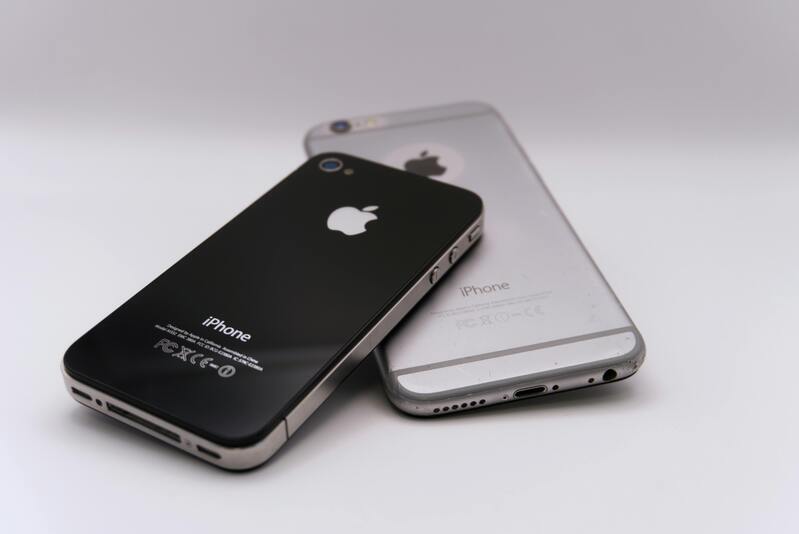
How to remove SIM card from iPhone safely using the correct tray method. (Image by Pexels)
1. How to Remove SIM Card from iPhone?
If you’re wondering how to remove SIM card from iPhone, the process only takes a few minutes when done carefully.
Step 1: Power Off Your iPhone
Although it is possible to remove a SIM while the phone is on, turning the device off first reduces the chance of connection errors or temporary network glitches.
Step 2: Locate the SIM Tray
On most iPhone models, the SIM tray is found on the side edge of the phone. Depending on the model, it may be on the right or left side.
Look for a small oval tray with a tiny pinhole.
Step 3: Use a SIM Eject Tool
Insert the SIM eject pin gently into the hole and apply steady pressure until the tray pops out slightly.
Then pull the tray out carefully with your fingers.
Step 4: Remove the SIM Card
Take the SIM card off the tray and keep it somewhere safe if you plan to reuse it.
Step 5: Reinsert the Empty Tray
Do not leave the tray slot open. Slide the tray back in gently and align it properly.
Many people ask, “How do I remove the SIM card out of my iPhone safely”. The answer is simple: use gentle pressure and avoid sharp or oversized objects.
To prevent damage:
- Use the official SIM ejector when possible
- Insert the pin straight into the hole
- Do not twist or force the tray
- If it does not open, try steady pressure instead of pushing harder
Forcing the tray is one of the most common mistakes.
If you do not have the eject pin, you may still be able to open the tray using a straightened paperclip with a narrow tip. Use care and apply light pressure only.
Avoid thick pins, knives, or sharp objects that may scratch the frame or damage the tray mechanism.
2. Will Removing SIM Card from iPhone Delete Everything?
Will removing SIM card from iPhone delete everything? In most cases, no.
Removing the SIM card does not erase:
- Photos
- Apps
- Messages stored on the device
- Contacts saved to iCloud or the phone
- Settings
- Notes or files
The SIM card mainly stores subscriber and network information. Once removed, your phone may lose cellular service, calling, texting, or data until another SIM or eSIM is activated.
However, if some older contacts were saved directly to the SIM card, they may not appear when the card is removed. So if you’re researching how to remove SIM card from iPhone, you can usually do it without worrying about losing personal content.
3. What to Do After Removing Your SIM Card (This Step Matters Most)?
Once you understand how to remove SIM card from iPhone, the next decision matters more than removal itself.
Option 1: Insert a New SIM
If you are switching carriers or replacing an old SIM, place the new card into the tray using the same notch alignment. Reinsert the tray fully, then restart your phone if needed.
Your carrier may activate service automatically, or you may need to complete setup.
Option 2: Keep Using Wi-Fi Only
Even without a SIM card, your iPhone can still work on Wi-Fi for many tasks.
You can continue using:
- FaceTime
- iMessage
- Apps
- Web browsing
- Streaming
This is useful for children, backup devices, or travel use on Wi-Fi only.
Option 3: Switch to eSIM
Many people who learn how to remove SIM card from** iPhone**are doing so because they want to stop using physical SIM cards altogether.
Instead of inserting plastic cards, you activate service digitally through your carrier. This is increasingly popular because it is faster and more flexible.
4. You May Want to Go Digital with eSIM
For many users, after learning “how to remove SIM card from iPhone”, the next logical step is asking whether they still need one.
eSIM offers several advantages:
- No physical card to lose or damage
- Faster carrier switching in many cases
- Useful for travel plans or secondary lines
- Cleaner setup when upgrading phones
- Less wear on the SIM tray over time
If your iPhone supports eSIM, it can be a simpler long-term solution than handling physical SIM cards.
5. Who Can Benefit Most from Switching to eSIM?
eSIM is not just a newer technology, it can be a more practical option for people who want flexibility and less hassle.
Frequent travelers often benefit first. Instead of swapping physical SIM cards in airports or carrying multiple cards, they may be able to activate travel plans digitally and manage service more easily.
People changing carriers may also prefer eSIM because some transfers can be completed online without waiting for a physical SIM to arrive. This can make switching faster and more convenient.
Users who need more than one number, such as separate personal and work lines, may also find eSIM useful. Many newer iPhones support multiple lines through eSIM features, making it easier to manage everything on one device.
It can also help anyone who searched how to remove SIM card from iPhone simply because they were tired of dealing with trays, pins, and tiny cards.
For many users, the biggest advantage of eSIM is not the technology itself, it is how much easier it can make everyday mobile service management.
Final Thoughts
Knowing how to remove SIM card from iPhone is a simple but useful skill. Done correctly, it takes only a minute and does not erase your data.
The bigger decision is what comes next: insert a new SIM, continue on Wi-Fi, or move to eSIM. For many modern users, eSIM offers the easiest path forward.
If your current setup feels inconvenient, removing the old SIM might be the first step toward something better.