

On This Page
Sometimes you may hear more than one person speaking during a phone conversation, and start wondering how to tell if you are on a 3-way call Android. This usually happens when someone adds another participant to the call using the conference calling feature.
On most Android phones, there are a few simple signs on the screen or during the conversation that can help you confirm whether a three-way call is active.
1. What Is a 3-Way Call on Android?
A 3-way call on Android is a calling feature that allows three people to participate in the same phone conversation at the same time. Instead of ending one call to contact another person, the caller can simply add a second participant and merge both calls into a single discussion.
This feature is commonly referred to as conference calling and is supported by most Android smartphones through the built-in Phone app. Once the calls are merged, all participants can hear and speak with each other in real time, making it convenient for quick group conversations. People often use this feature to coordinate plans with family members, discuss tasks with coworkers, or handle situations that require multiple people on the same call.
For users learning how to 3 way call on Android, the process is usually straightforward. It typically starts with calling the first person, then adding another call from the call screen, and finally merging the calls so everyone joins the same conversation.
While the overall process is similar across most Android devices, the exact buttons or labels may vary slightly depending on the phone model and the mobile carrier providing the call service.
2. How to Tell If You Are on a 3-Way Call Android
Sometimes, a third person can be added to a call without you realizing it right away. This usually happens when the person who started the call uses the conference calling feature to merge another participant into the conversation.
Most Android phones support conference calling as a built-in feature, but it only works if your mobile plan includes this capability. When enabled, users can combine multiple calls directly from the phone app without needing any additional tools.
How to tell if you are on a 3-way call Android? (Image by Unsplash)**
If you suspect that another person has joined your call, here’s how to tell if you are on a 3-way call Android:
Multiple Names or Numbers Appear on the Call Screen
One of the easiest ways to recognize a three-way call is by looking at the call screen. On many Android devices, the interface may display more than one contact name or phone number when multiple participants are connected.
Instead of showing a single caller, the screen may list separate call lines or multiple contacts involved in the conversation. This usually happens when two calls have been merged into one conference call.
The Screen Shows “Conference Call” or “Merged Calls”
Some Android phones clearly indicate when calls have been combined. After a second person is added and the calls are merged, the screen may display labels such as “Conference Call,” “Merged Calls,” or simply “Conference.”
These labels appear automatically when the device detects that multiple calls have been joined together. Seeing this message usually means that more than two participants are currently connected to the same call.
You Hear Multiple Voices on the Call
Another common sign is hearing more than one voice during the conversation. If you notice different people responding at different times, it likely means someone has added another participant to the call.
In many cases, the person who initiated the call may have merged two conversations together so everyone can speak at the same time. When this happens, the call becomes a three-way conversation through the phone’s conference calling feature.
3. How to Check During a Call If Someone Added Another Person
If you are unsure whether another participant has joined the call, Android phones provide several ways to confirm it while the conversation is still active. These options allow you to review the call status and see whether multiple participants are connected.
Checking the call interface can quickly reveal whether someone has added another person to the conversation.
Look for the “Manage Calls” or “Conference” Option
While a call is active, look at the control buttons displayed on the screen. Many Android devices include options such as “Manage Calls,” “Conference,” or “Merge.”
These buttons appear when the phone detects more than one call connection or when conference calling is available. Opening the call management menu may allow you to view additional options for handling multiple calls or merging conversations.
If this option appears during your call, it may indicate that another participant has already been added to the conversation.
Check the Call Participant List
Another way to confirm whether a call has multiple participants is by checking the call participant list. Some Android phones show the names or phone numbers of everyone currently connected to the call.
When more than one participant appears in this list, it usually means the conversation has been converted into a conference call. This feature helps users quickly understand who is part of the conversation and manage the call if needed.
Also read: How to Do a 3 Way Call on iPhone in Seconds (Simple Step-by-Step Guide)
4. How 3-Way Calling Works on Most Phone Plans
3-way calling, also known as conference calling, allows you to connect multiple people into a single call. Instead of ending one conversation to start another, your phone temporarily holds one call while you add a second person, then merges both into one conversation.
On most phones, the process follows a simple flow:
- Start a call with the first person
- Tap Add call and dial the second number
- Once connected, tap Merge calls to join everyone together
Because this feature is controlled by your carrier, not just your phone, your experience depends on the type of plan you have. Some carriers may limit how many people can join, restrict certain calls, or apply extra charges.
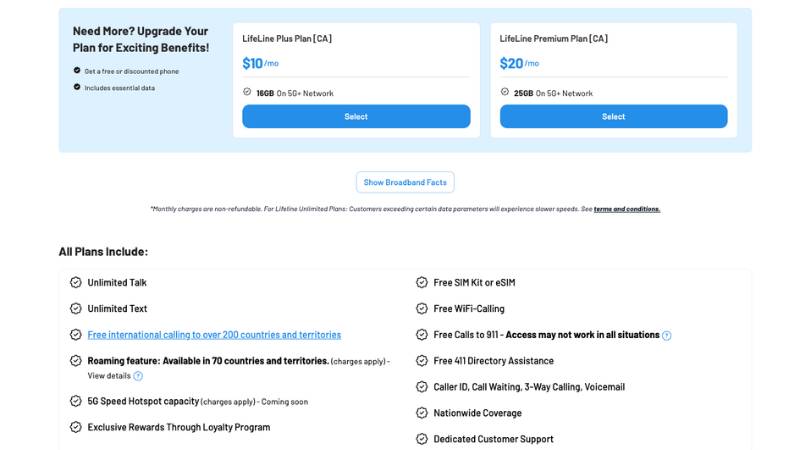
- Built-in 3-way calling for group conversations
- Call waiting and caller ID to manage incoming calls
- Voicemail access for missed calls
- Monthly talk, text, and data service
These features are designed to work out of the box, so users can handle calls, add participants, and stay connected without needing extra apps or add-ons.
Conclusion
Knowing how to tell if you are on a 3-way call Android helps you quickly recognize when multiple people are connected to the same conversation. Signs such as multiple names on the call screen, conference call labels, or hearing more than one voice can indicate that a three-way call is active.
Most Android devices support this feature when the phone plan includes calling tools like Caller ID, Call Waiting, voicemail, and 3-Way Calling, making it easier to manage group conversations directly from your phone.